
Description
WC Vendors – WooCommerce Multivendor Plugin
🏆 #1 WooCommerce multivendor plugin for turning your WooCommerce store into a thriving marketplace. Trusted by over 8,000 stores.
The WC Vendors Marketplace plugin is the easiest way to create your multivendor marketplace and earn commission from every sale.
Create A WooCommerce Marketplace
You can use WC Vendors to create all sorts of marketplaces such as:
- Physical Good Marketplaces (like Amazon, Etsy, Ebay)
- Digital Product Marketplaces (like Shutterstock, Envato)
- Services & Booking Marketplaces (like TripAdvisor, Airbnb)
- Subscription Marketplaces (like CrateJoy, Birchbox)
- 2nd Hand Goods Marketplaces (like Ebay, Facebook Marketplace)
Learn more about WC Vendors: Visit WC Vendors Website
Key WooCommerce Multi-vendor Features (Free Plugin):
- Easy & fast setup wizard (get up and running quick)
- New WooCommerce Vendor user role
- Register users and allow them to upgrade to become a Vendor
- Vendors (aka your sellers) get their own store and unique URL
- Set commission rate for sales (the % of revenue you share with Vendors)
- Handles simple, variable, and digital products
- Integrates with most themes
- Basic frontend dashboard for sales and orders reports
- Vendors can mark orders shipped
- WordPress Admin for publishing products
- Export orders
- Customizable templates
Pro and add-on features available:
- Add fees to commissions
- Set fixed or fixed + fee commissions
- Charge vendors commission per vendor or even per product
- Create membership plans for Vendors
- Sell subscription products
- Allow Vendors to sell bookings (eg. service marketplaces)
- Add auctions capabilities
- Pay Vendors commissions automatically with Stripe (and other compatible gateways)
- Store SEO compatibility
- Vendor vacation mode
- Vendor opening hours
- Let Vendors add store notices on their Vendor page
- Full front-end management of products
- Full front-end management of orders
- Self-managed Vendor coupons
- Advanced shipping management
- Vendor product reviews
- … And LOADS more advanced WooCommerce marketplace features!
Want see more Pro features? Click here to view the Pro version + addons
FAST & EASY TO USE – THE BEST WOOCOMMERCE MULTI-VENDOR PLUGIN
WC Vendors marketplace comes with a setup wizard to guide you through the initial setup of your marketplace. This gets you up and running quickly, ready to earn.
Best Supported Marketplace Plugin
We pride ourselves on providing prompt, quality support as well as high quality secure, robust code. We release regular updates for smooth operation of your marketplace business. We focus on including the best eCommerce features for our users based on WooCommerce and best eCommerce practices.
Grow With No Restrictions – Create A Thriving Multi-Seller Marketplace
With WC Vendors you can be assured that there are no restrictions on the number of vendors or products your marketplace can create. Scale your multi-vendor marketplace to the moon!
Your marketplace will allow your vendors to sell a range of different products including:
- Physical products
- Digital and Downloadable products
- Variable products
- Subscription products with our WC Vendors WooCommerce Subscriptions addon
- Booking products with our WC Vendors WooCommerce Bookings addon
- Auctions with our WC Vendors Simple Auctions addon
Here’s some more marketplace ideas!
- A physical goods marketplace (just like Amazon, Etsy)
- A downloads marketplace selling music, photos, video and other digital media (just like Shutterstock, Envato)
- A booking marketplace to sell cooking classes (just like TripAdvisor, Airbnb)
- A 2nd hand auction site (just like eBay, Gumtree)
Multiple ways to earn money with your multi-vendor marketplace
WC Vendors Marketplace has an advanced WooCommerce commissions system that allows you to set commissions for a variety of situations
Marketplace Vendor Commission Options
- Percentage
- Percentage + fee (Pro)
- Fixed (Pro)
- Fixed + fee (Pro)
- Sales by vendor (Pro)
- Sales by Product (Pro)
- Product Price (Pro)
Knowledge Base: Read more about how our WooCommerce commissions work
Create Vendor membership plans for your marketplace
WC Vendors Membership addon allows you to create and sell membership plans to your vendors. Setting different limits for your vendors on what products they can sell.
Features include:
- Create as many plans as you like
- Plan based commissions
- Set limits on products, categories, files and storage
- Easy to use subscription system for your vendors
- With the use of WooCommerce Subscriptions, you can setup a membership marketplace today!
Create your a multi-vendor membership site
Control your marketplace
You are able to control how products are published, vendor registration be it manual or automatic, what product types the vendors can post and customer information the vendors can see.
With WC Vendors Pro you have even finer grained control. You have total control of the product edit forms including what fields are visible and what are required for vendors. By providing a complete frontend dashboard for your vendors you can allow them to manage their storefronts while you can focus on sales and marketing.
Customize Your WooCommerce Vendors Store Easily
Now you can design the look of your store with multiple options available. There are several vendor specific shortcodes available for admins to utilise around their site. For vendor store fronts there are 10 great widgets available in WC Vendors Pro. You can place these in any widget enabled area within your theme and are restricted to the vendor store fronts. This is a great way to choose which features you’d like your vendors store fronts to have.
Knowledge Base: Learn more about Pro widgets
Developer Friendly, Loads Of Compatible 3rd Party Plugins
We encourage 3rd party developers to work with us to create great extensions that work with our products. We keep an updated list of compatible plugins on our website as well as here. If you’ve built a plugin for WC Vendors products, please be sure to let us know!
Shipping
- Epeken All Kurir Plugin for WooCommerce
- Marketship
- Multi-Carrier Shipping Plugin for WooCommerce
- Table Rate Shipping for WC Vendors
- WooCommerce FedEx Shipping Plugin with Print Label
- WooCommerce UPS Shipping Plugin with Print Label
- … And many more!
Payment Gateways
Compatible with over 100+ payment gateways to take payments from your customers. You can use any payment gateway that is compatible with WooCommerce to receive payments. If you want to also pay your vendors through your marketplace, then you can use our compatible vendor payment gateways.
Vendor Payment Gateways
Pay your vendors their WooCommerce commissions with these gateways and payment solutions
- Stripe Connect Commissions & Gateway (Official WC Vendors Addon)
- Payouts for WC Vendors
- MangoPay for WooCommerce
- Escrow for WooCommerce
- Mollie Connect for WC Vendors
- Square Payment Gateway for WCVendors
Vendor Features
WooCommerce Vendor Stores
- Sellers get their own store and unique URL
- Store fronts can be customized through templates
- Multiple store front styles (Pro feature)
- 10 great pro widgets for store fronts (pro feature)
- Vendor store notices to advertise coupons or sales (Pro Feature)
- Vendor vacation mode (Pro Feature)
- Vendor social media profiles (Pro Feature)
- Vendor Store SEO (Pro feature)
- Store Opening hours (Pro Feature)
WooCommerce Vendors Dashboard
- Basic frontend dashboard for sales and orders reports
- Vendors can mark orders shipped
- WordPress Admin for publishing products
- Export orders
- Complete frontend dashboard with no WordPress admin access for vendors (Pro feature)
- Complete product, order, coupon management (Pro Feature)
- Add tracking numbers to orders (Pro Feature)
- Print shipping labels (Pro Feature)
Flexible WooCommerce Commissions options
- Percentage based commission split between the admin and the seller
- Set commission rates at the product, vendor or global level
- Fixed, fee, tiered commissions based on sales of products, vendor or price, product category commissions (Pro Feature)
- Sell vendor memberships (Paid Add On)
Product Management
- Vendors can manage their products from the WordPress Admin
- Manage all product types and their options from the frontend dashboard (Pro Feature)
- Manage and create attributes, variations (Pro Feature)
- Manage shipping at the product level (Pro Feature)
- Customers can review products. Vendors cannot modify these reviews (Pro Feature)
Vendor Discount Management (Pro Feature)
- Vendors can create and manage their coupons
- Vendors can set the limits, expiry of coupons
Shipping management (Pro Feature)
- Shipping can be set at the product, vendor or global level
- Vendors can set their shipping policies
- Table rate shipping options
- Flat rate shipping options
Advanced Options to control every aspect of your marketplace (Pro Feature)
- Admins can manage their vendors and applications
- Vendor earning reports
- Automatic plugin updates and support
- Setup wizard for easy configuration of advanced features
- Advanced Form management
- Three different product form templates available (Standard, Simple and Downloadable)
- Make any field required
- Hide any field or section from the vendors
- And much much more..
Found a bug?
Reach out to our team, we love hearing from our development partners.
Screenshots
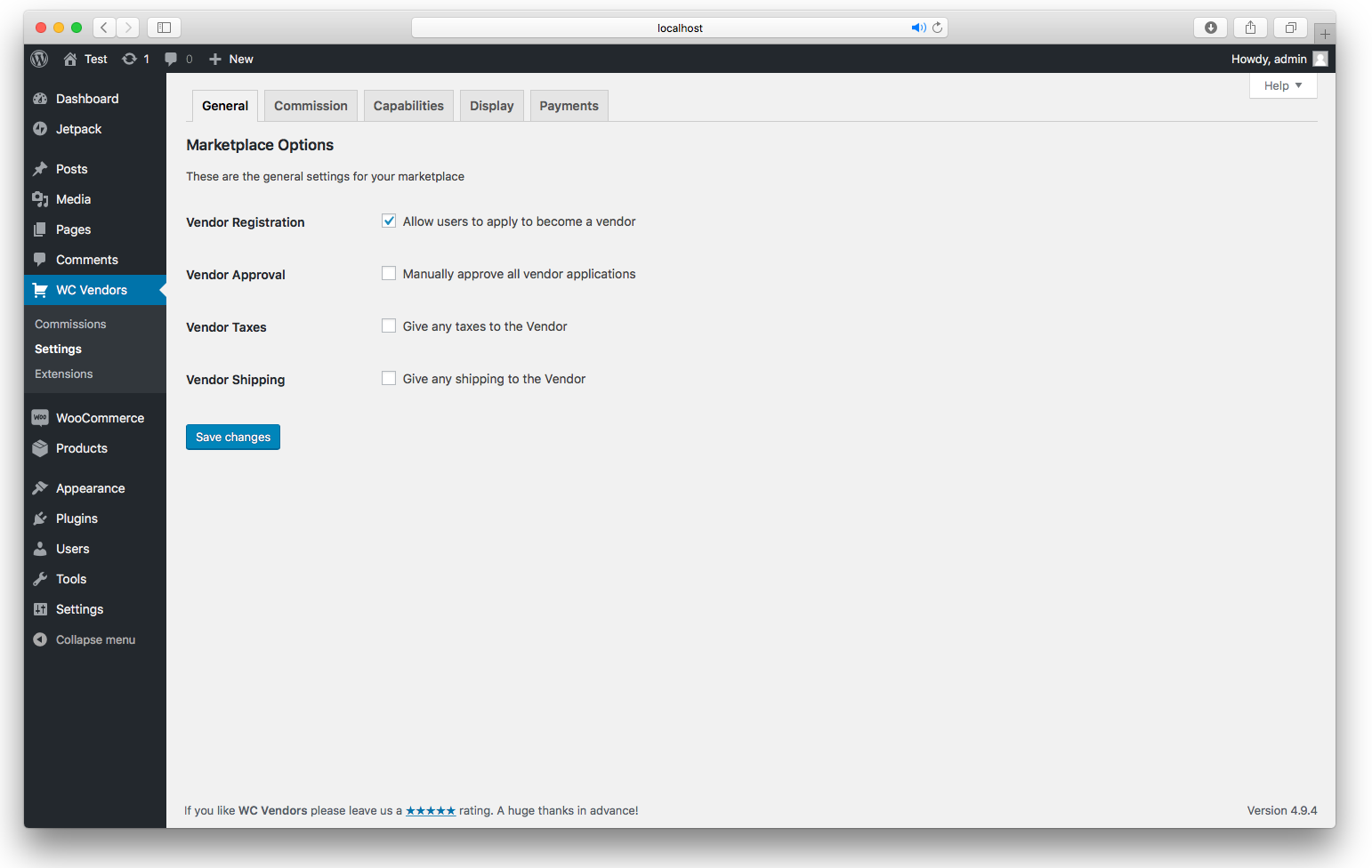
General Options - Configure your general marketplace settings here 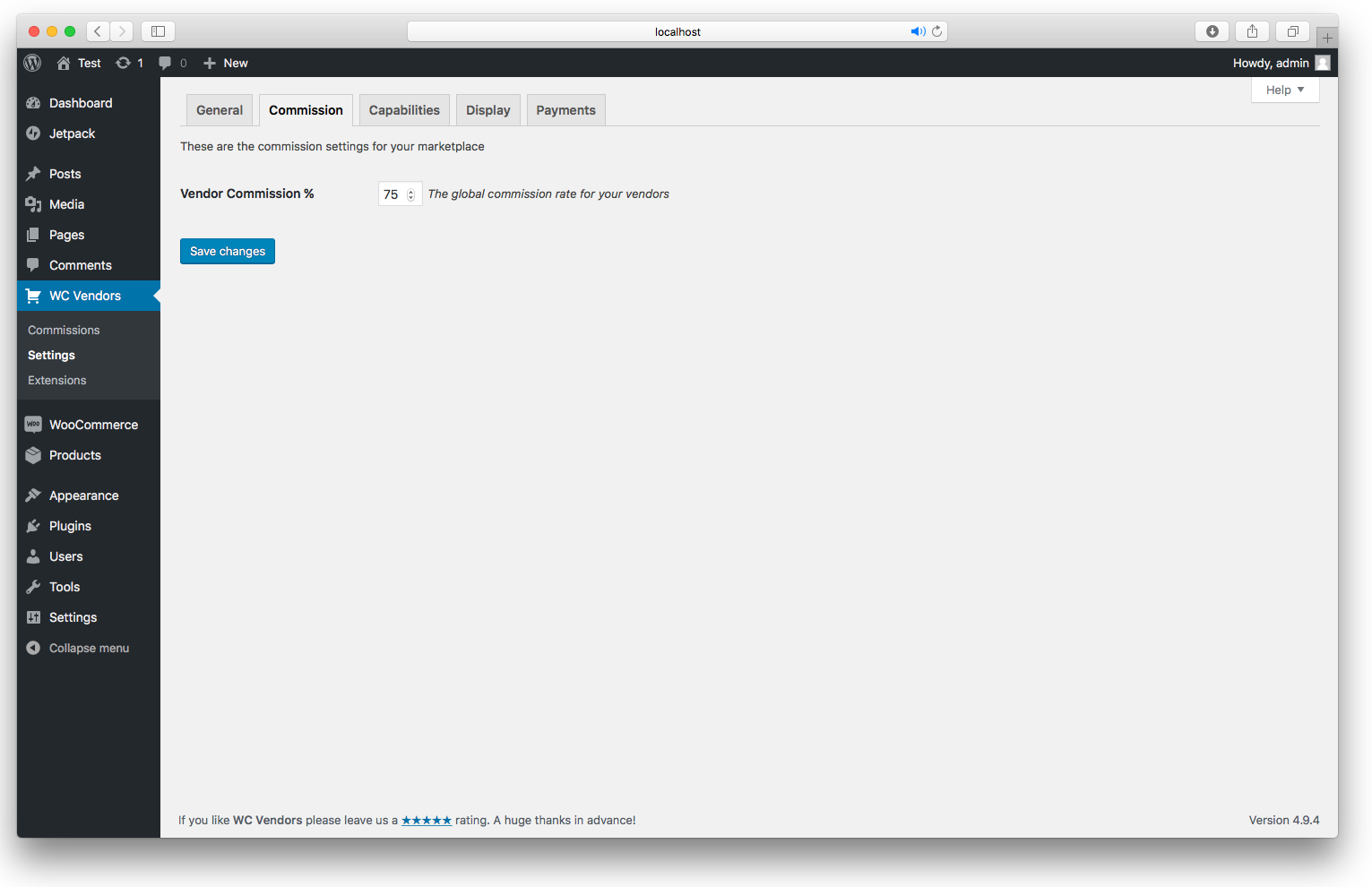
Commission Option - Set your percentage commission here 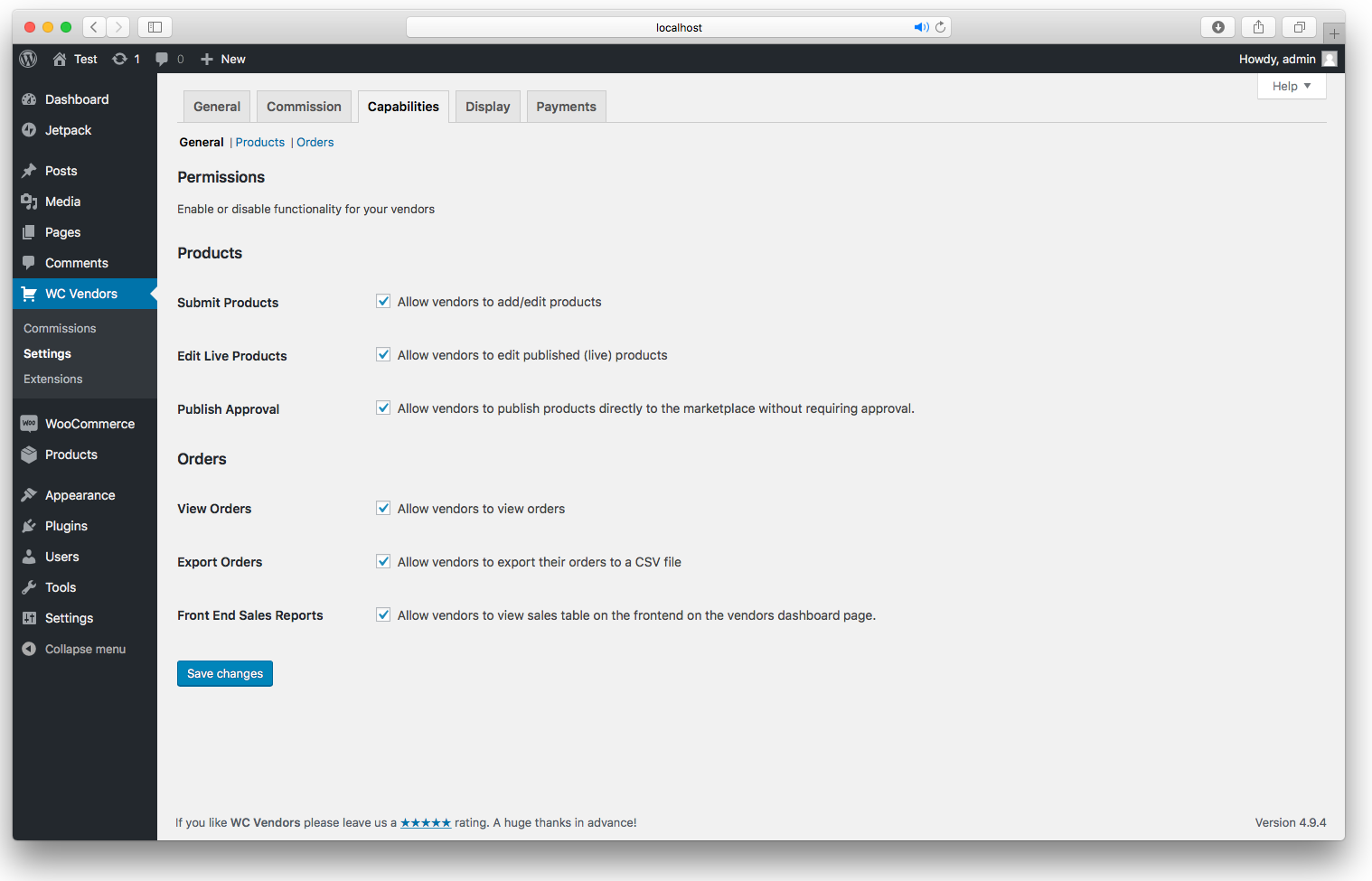
Capabilities General - Product and order functionality 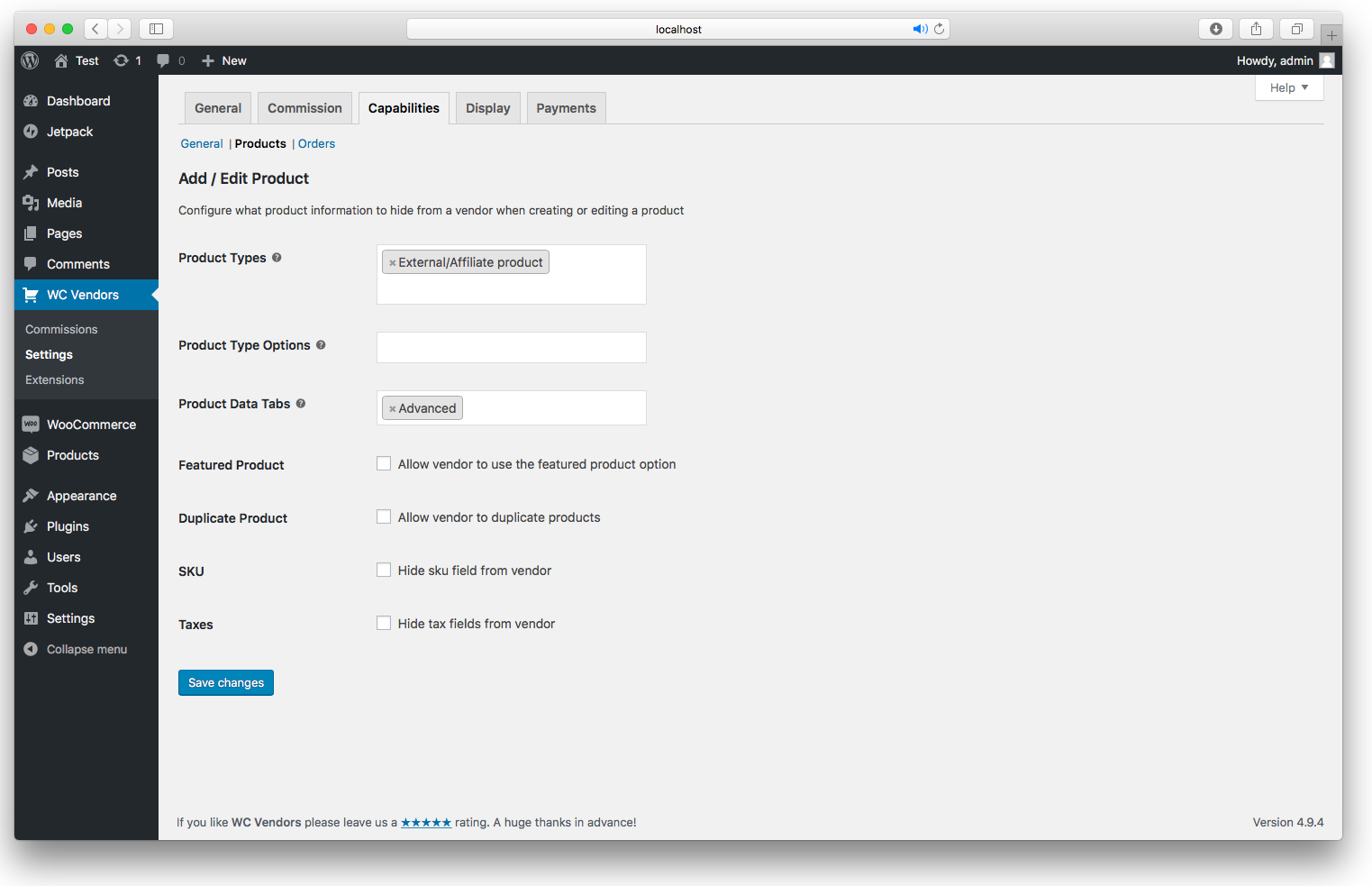
Capabilities Product - Configure what to hide from the vendor on the product edit screen 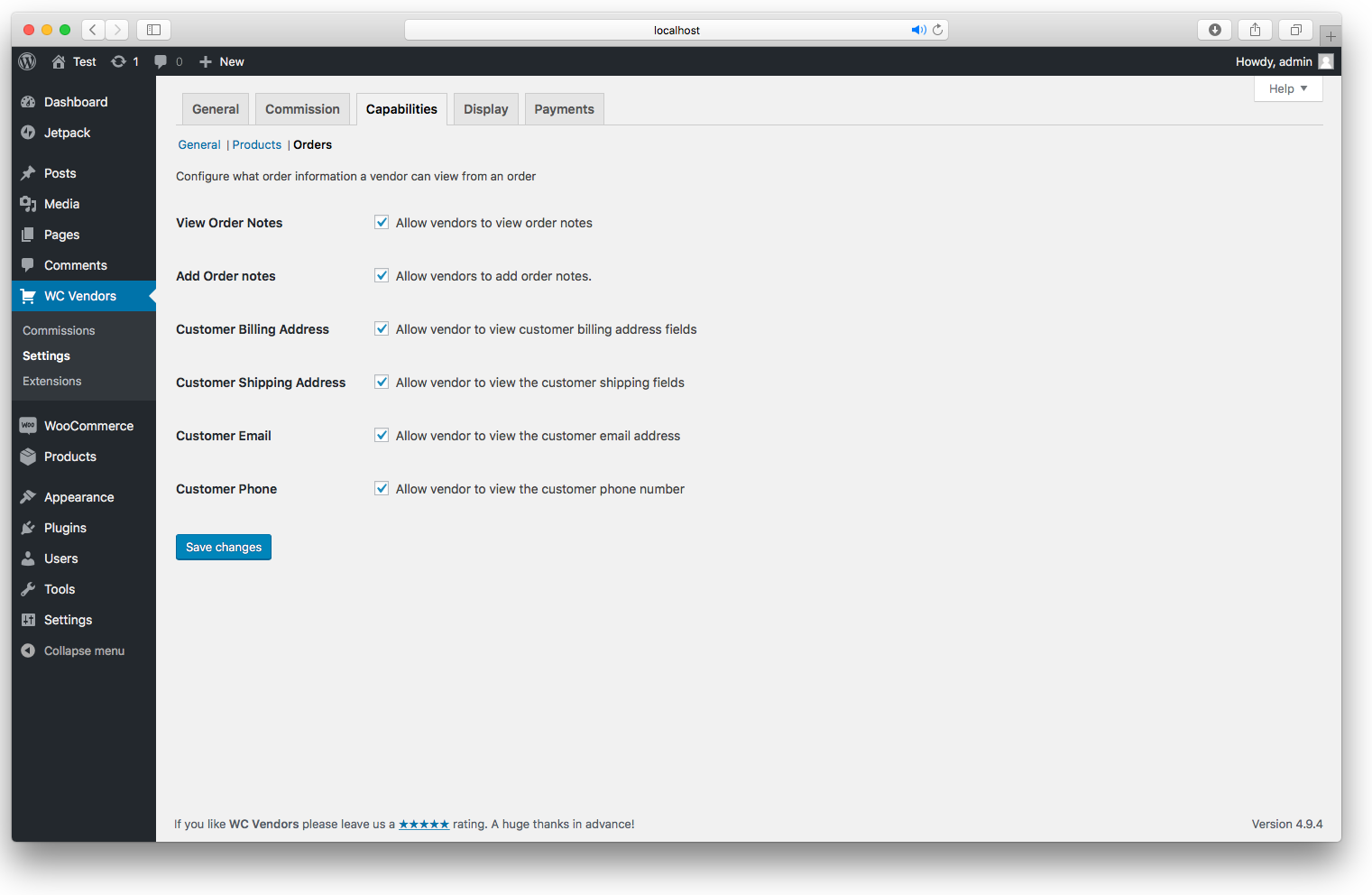
Capabilities Order - Configure what the vendors can do with their orders 
Display Options - Set the pages used for WC Vendors 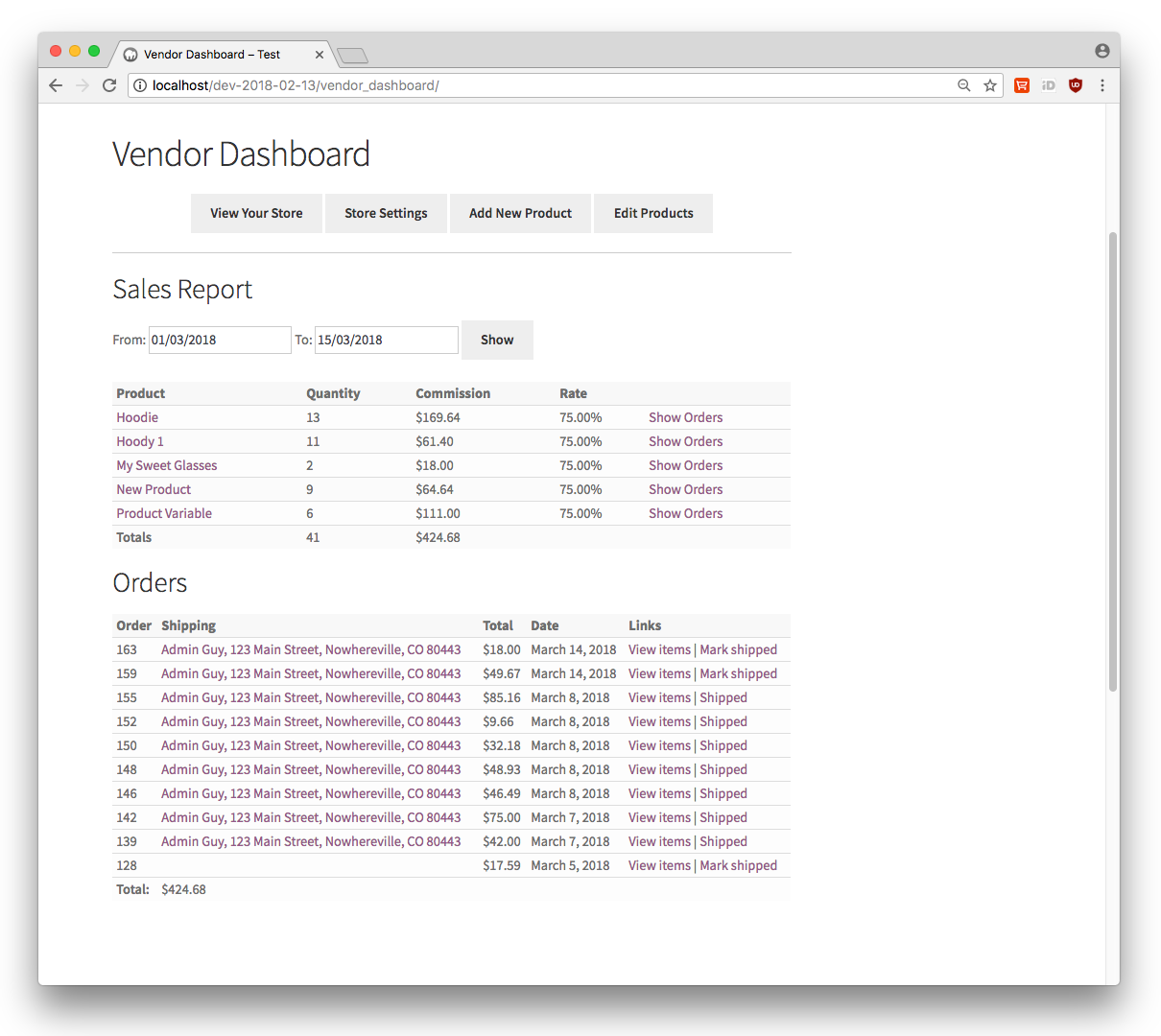
Vendor dashboard 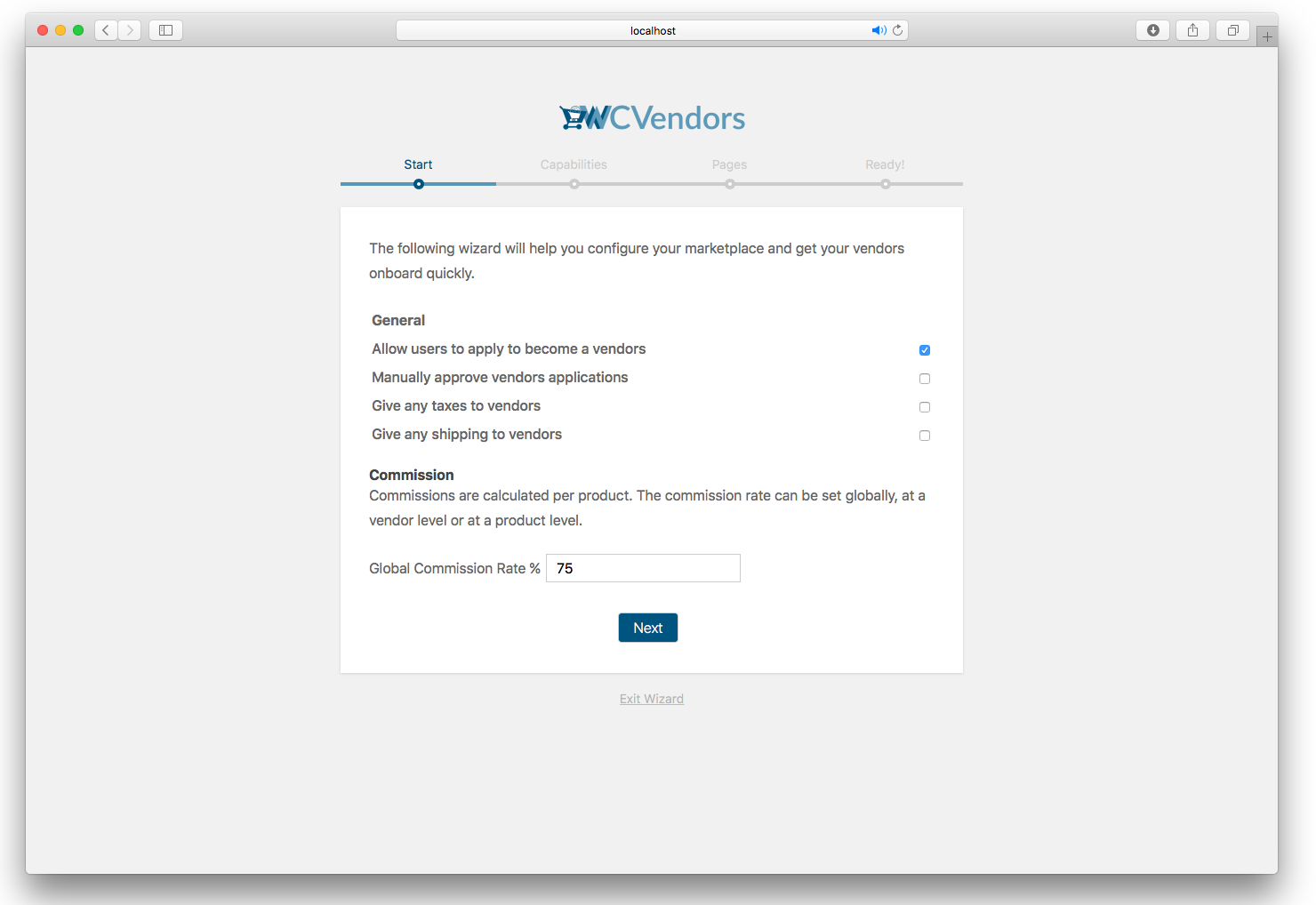
Setup Wizard General options 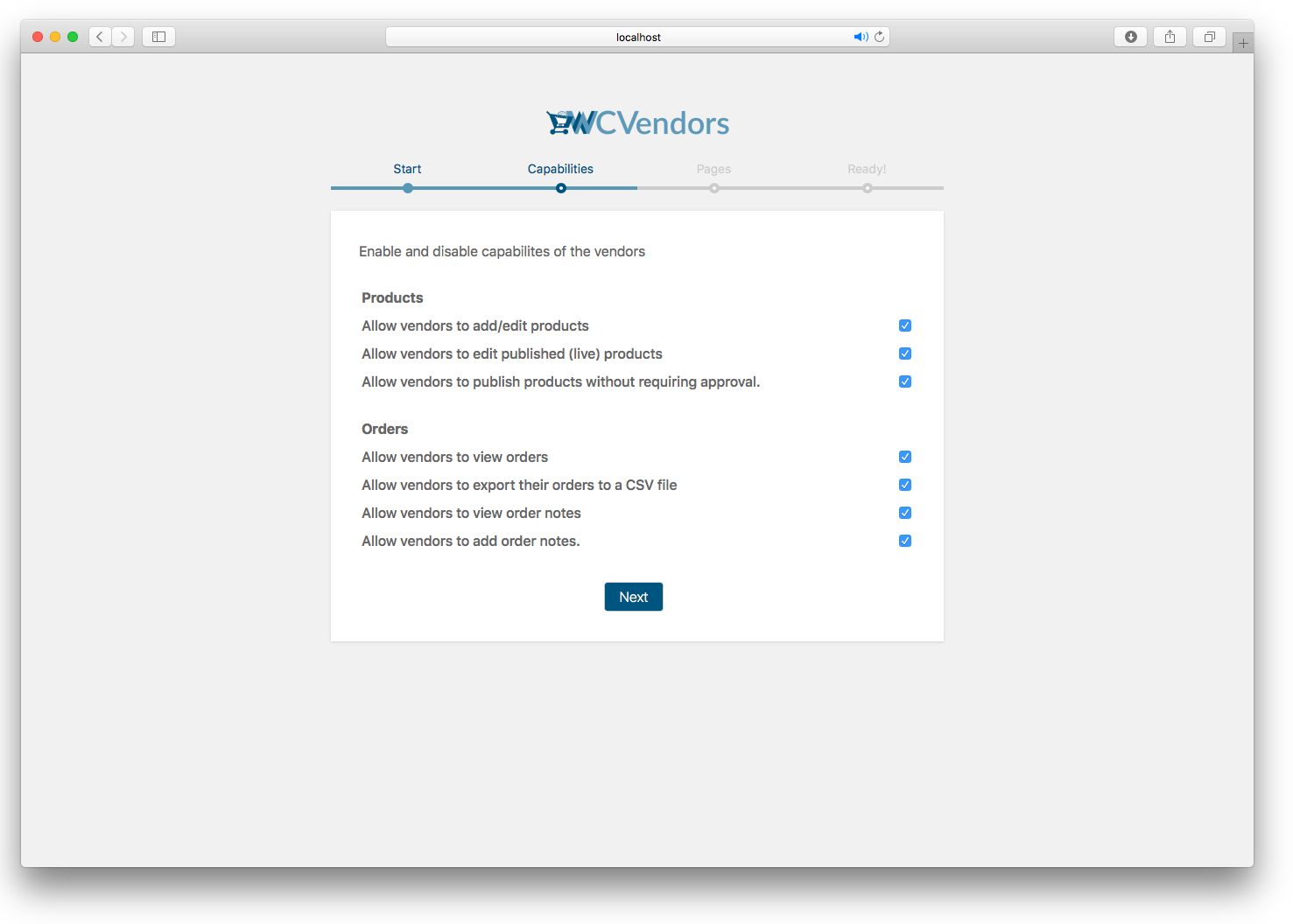
Setup Wizard Capabilities 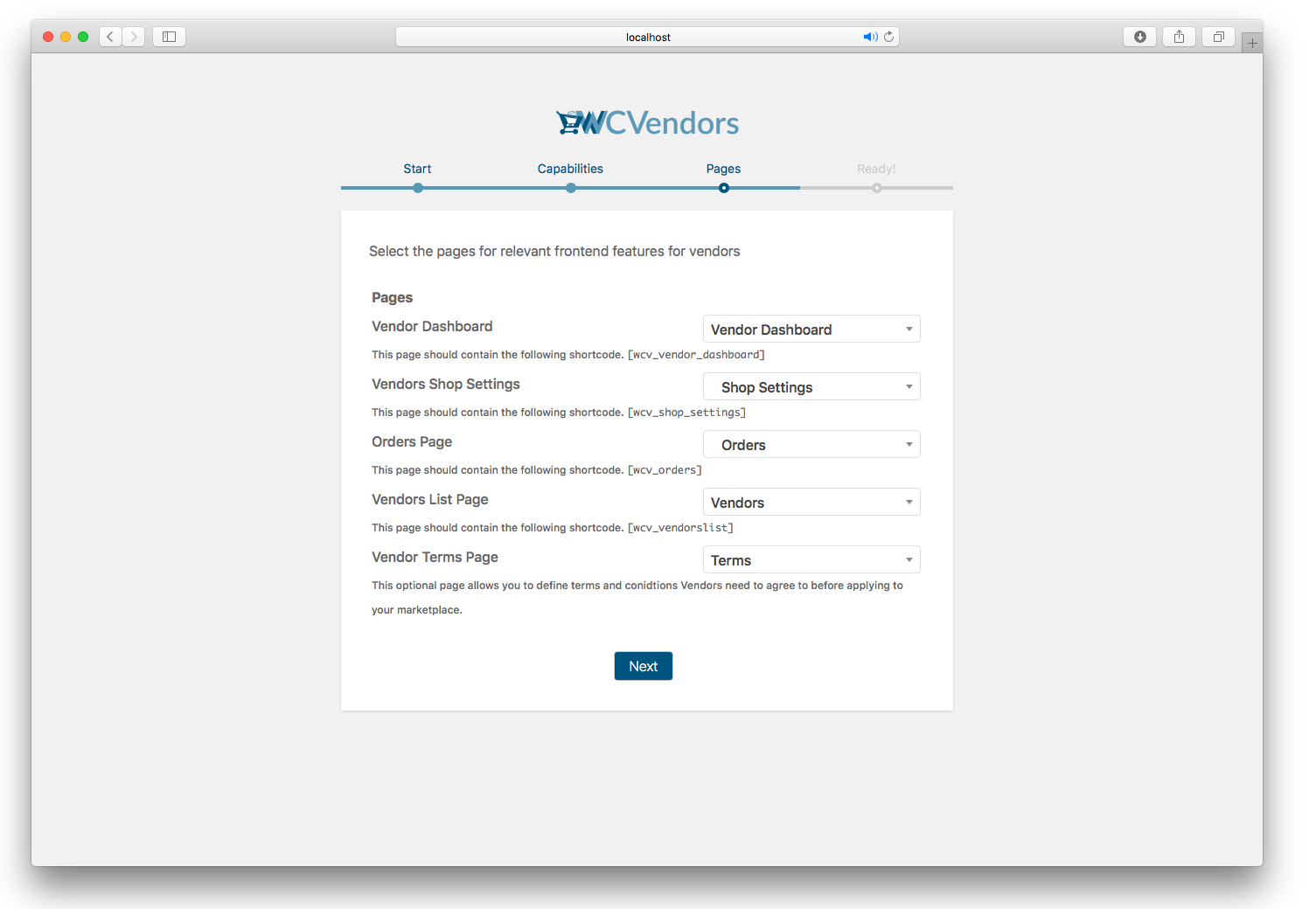
Setup Wizard Pages 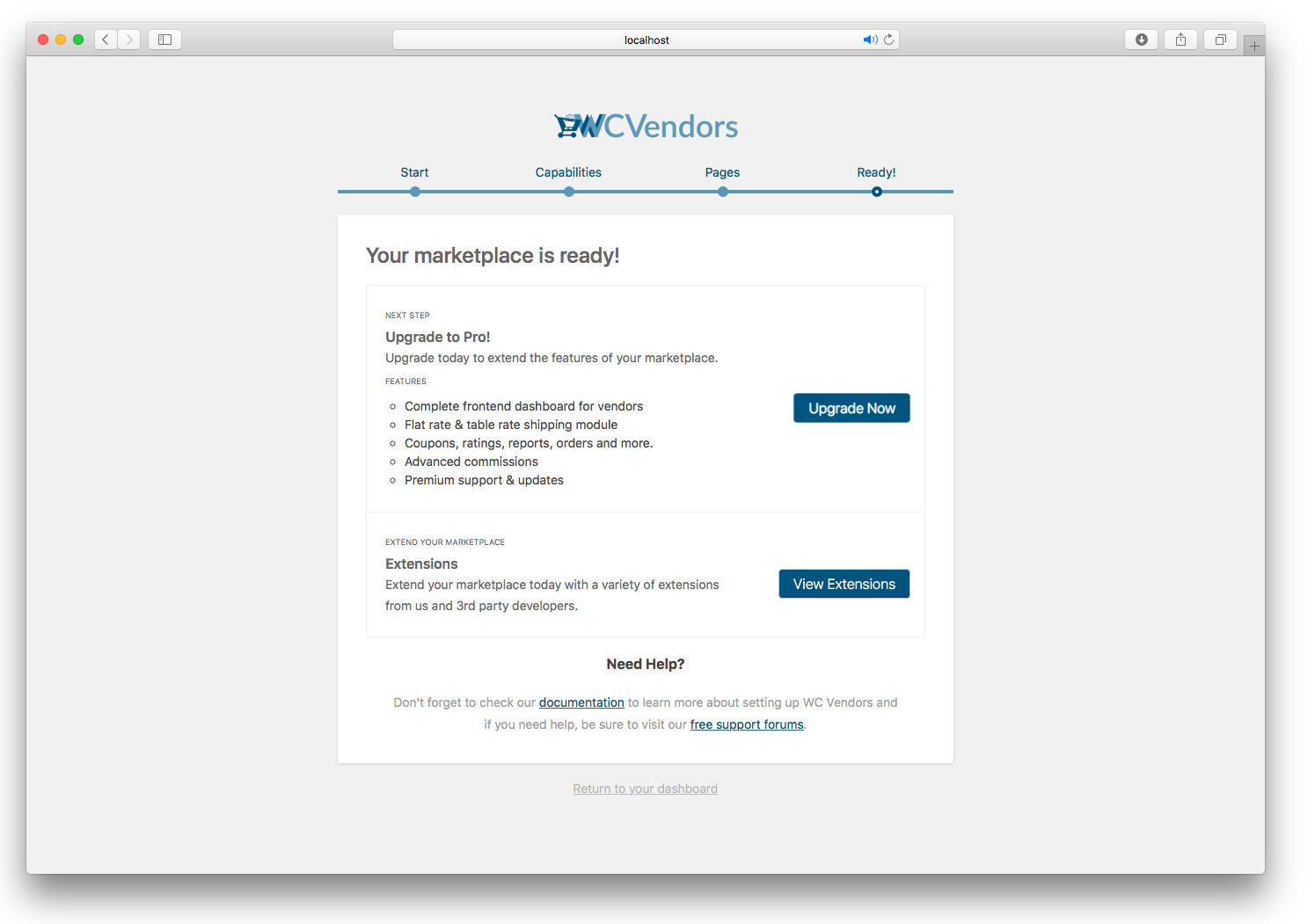
Setup Wizard complete 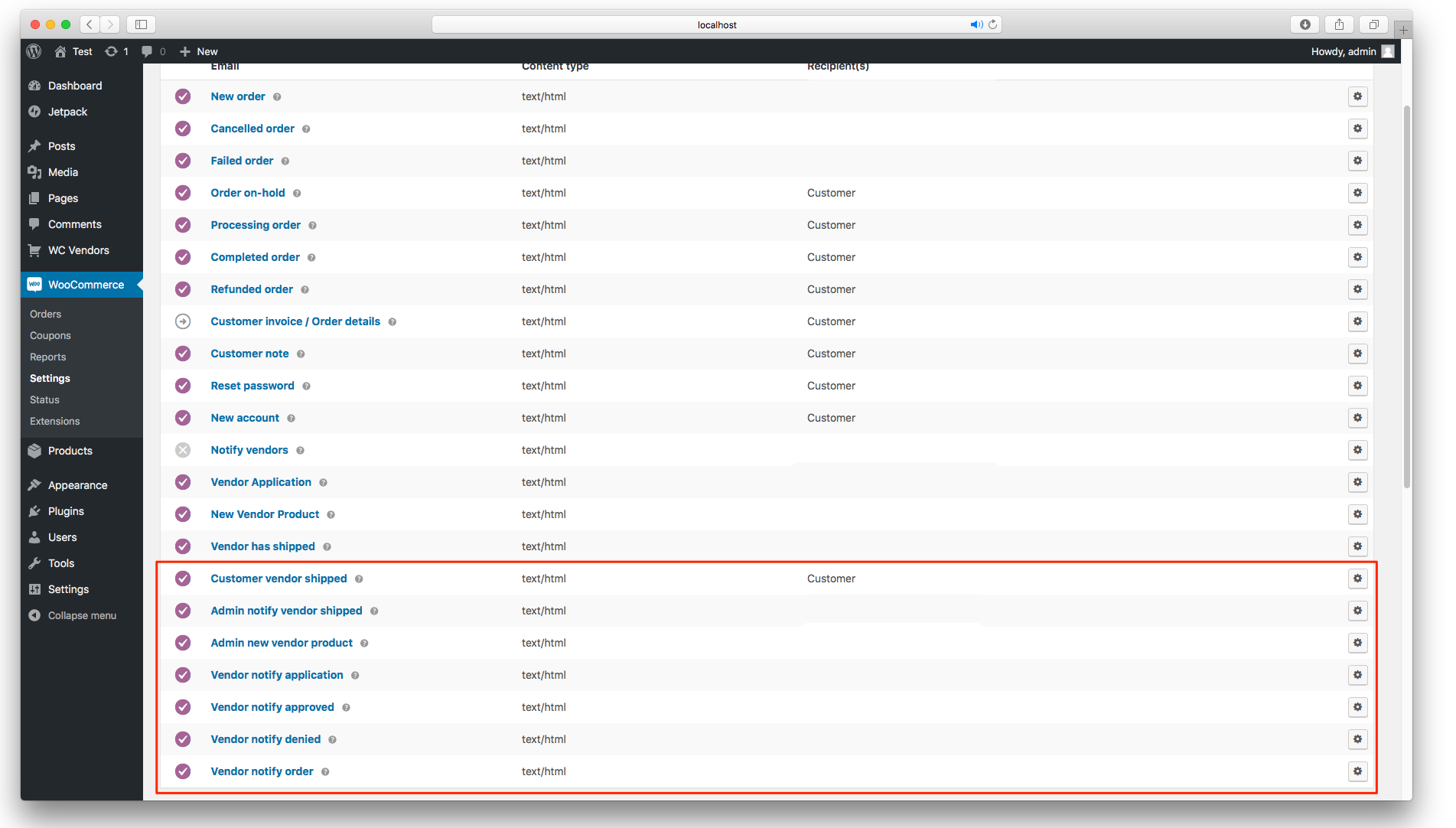
Email notifications for admins, customers and vendors
Installation
- Download and install from WordPress.org via Plugins -> Add New on your dashboard.
- Launch the setup wizard and follow the setup screens.
- All settings are available under WC Vendors -> Settings on the backend of your site.
- Configure your email notifications under WooCommerce -> Settings -> Emails screen,
- View Commissions under WC Vendors -> Commissions and WooCommerce -> Reports -> WC Vendors screens.
- Vendors and pending vendors are available on the WordPress -> Users screen.
FAQ
-
What payment gateways are supported?
-
All WooCommerce payment gateways are supported. You can read more about difference between payment gateways and vendor payouts here
-
What themes are supported?
-
You can use any theme that is 100% WooCommerce compatible. We have a list of free and paid themes on our website that are known to work with our plugins.
-
Can we give taxes to vendors?
-
Yes, you can easily assign product taxes to a vendor’s commission so that they are provided with all taxes.
-
What languages do you support?
-
Our plugins are fully translatable so you can translate into which ever language you choose using applications like POEdit or the free Loco Translate plugin.
-
What version of WooCommerce and WordPress do you support ?
-
All our development is performed on the latest versions of WooCommerce, WordPress and PHP. Rest assured all our code is tested at the absolute latest versions. We require a minimum of WooCommerce 4.0 to function correctly.
-
Where do I get help?
-
You can post a support question on the support tab – https://wordpress.org/support/plugin/wc-vendors
Also be sure to visit our documentation https://docs.wcvendors.com/
-
Does WC Vendors Marketplace work with Multisite?
-
WC Vendors Marketplace does not work with multisite WordPress. There are no plans to support this.
-
Where do I report security bugs found in this plugin?
-
Please get in touch with our team directly.
Reviews


Contributors & Developers
“WC Vendors – WooCommerce Multi-Vendor, WooCommerce Marketplace, Product Vendors” is open source software. The following people have contributed to this plugin.
Contributors


“WC Vendors – WooCommerce Multi-Vendor, WooCommerce Marketplace, Product Vendors” has been translated into 1 locale. Thank you to the translators for their contributions.
Interested in development?
Browse the code, check out the SVN repository, or subscribe to the development log by RSS.
Changelog
Version 2.5.0.1 – 12th April 2024
- Bug Fix: Yoast SEO Compatibility issue
Version 2.5.0 – 9th April 2024
- Feature: Usage Tracking
- Improvement: Add Yoast SEO Compatibility
- Improvement: Decrease batch size to 200
- Bug Fix: A fatal error occurs when performing a bulk action and moving to another page of records on the commission page
- Bug Fix: Can’t edit order where it contains a vendor that doesn’t exist anymore
- Bug Fix: Database Product Data Update Progress Bar Notification is Stuck At 100%
- Bug Fix: Duplicate blank order with high-traffic
- Bug Fix: Fatal when viewing Vendor Dashboard page as logged out guest user
- Bug Fix: Incorrect total order on the Vendor Dashboard
- Bug Fix: The license page should be near the bottom of the menu
- Bug Fix: Missing sub-orders
- Bug Fix: Stuck at 100% synchronizing notice
- Bug Fix: Vendor sub-order compatibility with PDF Invoices & Packing Slips for WooCommerce by WPOvernight
- Bug Fix: New update broke The Plugin Pros enable PayPal payout checkbox
Version 2.4.9.3 – 23rd February 2024
- Improvement: Optimize the sync progress
- Bug Fix: Critical error when visiting Woocommerce Emails setting page
Version 2.4.9.2 – 22nd February 2024
- Improvement: Update vendor orders meta query for backward compatibility
- Improvement: Vendors status sync is not running properly enhancement
- Improvement: Show progress of background updates
- Improvement: Optimize the All Vendor page queries
- Bug Fix: Outstanding Commissions on the All Vendors page should only show unpaid commissions
- Bug Fix: Admin Created Vendor Is Status Inactive
- Bug Fix: All vendors page – Pending vendor tab is showing all vendors
- Bug Fix: New order emails problem after last update
- Bug Fix: Legacy WooCommerce reports showing double data
Version 2.4.9.1 – 15th February 2024
- Bug Fix: The All Vendors page is showing blank after upgrading to 2.4.8+
Version 2.4.9 – 8th February 2024
- Feature: Added dedicated Help & About pages
- Feature: Added pagination for the order listing in the Vendor Dashboard
- Feature: New central license page
- Feature: New setting: Preferred Payout Method
- Improvement: Admin ability to mark order unshipped
- Improvement: Deprecate all old ‘pv_’ prefixed filter and action hooks
- Improvement: PHP 8.2 Compatibility
- Improvement: Replace team photo on the About page
- Bug Fix: All Vendors page – The view orders feature is not filtering the vendor orders properly
- Bug Fix: Incorrect product sold count on the admin commissions page
- Bug Fix: Orders in WP Admin Not Viewable
- Bug Fix: The total number of products sold is incorrect on the Commission page
Version 2.4.8.2 – 7th February 2024
- Improvement: Added admin notice to ask admin to update Pro to v1.8.8
- Improvement: Added a new filter to change the batch size when synchronizing data.
- Improvement: Added CLI to sync data via the command line.
Version 2.4.8.1 – 31st January 2024
- Bug Fix: Re-register lowercase constant for old Pro plugin compatibility.
Version 2.4.8 – 31st January 2024
- Feature: New All vendors admin page
- Feature: HPOS compatibility
- Improvement: Recoded the way Orders and Vendor sub-orders are handled
- Improvement: Tidy up wizard ready screen, change URL of opt-in, form add helpful links
- Improvement: Lite bar at the top of WCV pages
- Improvement: Redesign the extensions page
- Bug Fix: All Vendors: Incorrect Inactive total count
- Bug Fix: Author Field Removal in WordPress Post Editing
- Bug Fix: Check WooCommerce activated before bootstrapping
- Bug Fix: Fatal error after creating an order manually
- Bug Fix: Fatal errors during refund order
- Bug Fix: No user found after approving/rejecting a vendor
- Bug Fix: PHP Warning: Attempt to read property “line_total” shows up on the Vendor Orders page
- Bug Fix: Sort the Total column in the commission table
- Bug Fix: The default email subject is not showing up
- Bug Fix: The variable product order is not listed on the Sales report
- Bug Fix: Updating the users profile will remove the secondary role
- Bug Fix: Updating the vendor’s shipment does not reflect on the Commission page and Vendor Orders page
- Bug Fix: Vendor Dashboard Sales Report issues
- Bug Fix: Vendor search bar not showing
- Bug Fix: Restore missing CSS
- Bug Fix: Registration Error Message Does not contain any message
- Bug Fix: Remove export commission option
- Bug Fix: Inactive vendor message
Version 2.4.7.3 – 20th November 2023
- Bug Fix: Commission sorting issue
Version 2.4.7.2 – 16th November 2023
- Bug Fix: Insert commission is not working
Version 2.4.7.1 – 14th November 2023
- Improvement: Declare incompatible with WC Cart/Checkout blocks
- Improvement: Commissions page security
Version 2.4.7 – 23rd May 2023
- Added: Implement review request admin notice
- Added: Mark HPOS incompatibility
- Added: PHPCS for WC Vendors
- Added: Updated plugin links
- Added: Setting to make vendor the primary role
- Fixed: Bulk actions in admin Orders page causes Orders to be marked as shipped
- Fixed: Cancelled email issues
- Fixed: Constant FILTER_SANITIZE_STRING is deprecated
- Fixed: Misalignment issues on Commissions admin page
- Fixed: PHP8 compatibility – Unsupported operand types: string + float
- Fixed: The bulk action vendors dropdown not showing after quick edit
- Removed: Circle CI
- Updated: Code cleanup
Version 2.4.6 – 31st March 2023
- Added: Vulnerability reporting point of contact (#886)
- Fixed: Vendor selectbox incorrect or empty on product page (#885)
Version 2.4.5 – 6th January 2023
- Fixed: Escaped attributes to address security vulnerability report (#882)
Version 2.4.4 – 24th November 2022
- Fixed: Admin notify product email firing twice
- Fixed: New vendor list pagination doesn’t work when using the display options grid or list. (#870)
Version 2.4.3 – 21st July 2022
- Added: Paypal Masspay Web CSV export (#860)
- Added: Vendor ID and Product Count Columns on user screen (#858)
- Updated: Vendors list page redesign (#846)
- Updated: Dutch translations thanks Eric (#865)
- Updated: Show the Vendor selectbox while using Gutenberg for products (#853)
- Fixed: Order Notification for the vendor does not include the coupon discount (#849)
- Fixed: Order status not getting updated with partial refund (#829)
- Fixed: Shipping issue with WC Vendors Pro #1661 (#855)
Version 2.4.2 – 19th May 2022
- Updated: Dev tools (#842)
- Fixed: Vendor menu shows on Admin dashboard (#844)
- Fixed: Duplicate H1 tag on products (#840)
- Fixed: The colspan does not match in vendor dashboard (#838)
Version 2.4.1 – 3rd March 2022
- Updated: Sales report with refund details (#822)
- Updated: Menu page parameter type in WordPress 6.0 (#826)
- Reverted: “Added: Log marketplace commissions to commissions table (#806)” (#832)
- Fixed: Undefined variable ids (#816)
- Fixed: Order export fails if the order has been deleted #813 (#814)
Version 2.4.0 – 10th January 2022
- Added: Marketplace admin can mark orders shipped (#808)
- Added: Log marketplace commissions to commissions table (#806)
- Added: Filter hook to add CSS classes to apply for vendor label (#797)
- Updated: Daily filter for commission by vendor report (#803)
- Fixed: Files not assigned to vendor when assigning product (#791)
Version 2.3.2 – 2nd August 2021
- Fixed: Fatal error on activation with PHP7.3 and below #785
Version 2.3.1 – 22nd July 2021
- Fixed: Duplicate seller info in single product page. #780 (#781)
Version 2.3.0 – 19th July 2021
- Added: New filter to allow custom order visibilities (#754)
- Added: Ability to delete commission rows (#765)
- Updated: UI titles to use title case (#768)
- Updated: Various strings in the codebase (#767)
- Updated: Disabled cron system if deprecated PayPal settings not active (#769)
- Updated: Action/Filter names need to be made consistent #716 (#760)
- Fixed: Orders in order template #757 (#761)
- Fixed: Vendor sales report table should get hidden as per permission set by admin. #756 (#758)
- Fixed: WordPress REST API (Pages asset) & WC Vendors Marketplace (#770)
- Fixed: Call to a member function get_id() on boolean #745 (#755)
Version 2.2.4 – 25th March 2021
- Added: New column on commissions page for shipped (#743)
- Updated: Tested to WP and WooCommerce
Version 2.2.3 – 1st March 2021
- Added: PHP8 support
- Updated: enhancement for New customer order vendor notification – Add link in the order number redirecting to /pro-dashboard/orders page #729 (#730)
- Updated: Tested WP Version 5.6.2 & WC version 5.1
- Fixed: Order total incorrect in vendor order emails when coupon is used #726 (#727)
- Fixed: Commission Total loads 1970 as the start and the end date (#736)
- Fixed: CSS Issue in admin update bubbles (#735)
- Fixed: Bulk assigning products to a vendor does not work #724
= Version 2.2.2 – 25th November 2020
* Added: Make commissions table in WP Admin filterable (#717)
* Added: Filter to the vendor select minimum input length #688
* Updated: Setup wizard updates (#714)
* Updated: Changed WooCommerce missing behaviour (#712)
* Updated: Remove deprecated payments tab from settings (#705)
* Updated: Update vendor drop downs place holder #701 (#706)
* Updated: User store name or user id for vendor search in wp admin #669 (#697)
* Updated: Add a filter to handle customer email notification for the mark received shipping #691
* Updated: Reverted products import code
* Fixed: Yith Wishlist Conflict for vendor roles. #707 (#708)
* Fixed: Deprecated WooCommerce call #709 (#710)
* Fixed: Deleted products don’t have a title on the commissions table #702 (#703)
* Fixed: Advanced option – Delete all data, requires the Wizard to be completed before users can use the shortcodes on the pages #681 (#700)
* Fixed: Bulk editing products and adding tags would cause the assigned vendor store on those bulk edited products to disappear #687
Version 2.2.1 – 28th August 2020
- Fixed: Permission check for product imports (#685)
- Fixed: Depreciated JS in WP 5.5 #680 (#684)
- Fixed: Product and category search not working on Products Page (#679)
- Fixed: Solve error on Gutenberg save
Templates Updated:
templates/dashboard/denied.php
Version 2.2.0 – 13th August 2020
- Added: Support for WC4.4 and WP5.5 (#674)
- Fixed: Page 2 of the vendors pro list pagination returns a page 404 not found #667 (#668)
- Fixed: Vendor assignment in product edit only recognizes vendors #661
- Fixed: Filter products by vendor on products page in wp admin. (#664)
- Fixed: Performance issue on commissions page (#663)
- Fixed: Commissions page in the admin panel, page pagination does not work. #660
Version 2.1.20 – 8th of May 2020
- Added: Add date range filters for commissions table #649 (#651)
- Updated: Tested to WooCommerce 4.1 (#654)
- Updated: Update filter names in WCV_Shortcodes class #644 (#647)
- Fixed: Front-end issues of Store Info option ( Enabled/Disabled ) not working #599 (#653)
- Fixed: Timezone display for commissions #625 (#648)
- Fixed: Order date query bug. (#646)
- Fixed: get current page error on setup wizard #640 (#641)
Version 2.1.19 – 11th March 2020
- Confirm WordPress 5.4 and WooCommerce 4.0
Version 2.1.18 – 5th February 2020
- Added: New action hook to image field. (#620)
- Updated: Vendor_list shortcode argument to has_products #595
- Updated: Deploy updates (#616)
- Fixed: Vendor select box empty for marketplaces which has over 100 vendors #614 (#615)
- Fixed: Urls in help tab (#623)
Version 2.1.17 – 2nd January 2020
- Added: New template tag for sold by link (#602)
- Updated: Disabled PayPal Adaptive payments #596
- Fixed: text domain on strings
- Fixed: Performance issue in WP-Admin area in large marketplaces #604 (#608)
- Fixed: CircleCI (#606)
- Fixed: Sold by label spacing on single product page #597
Version 2.1.16 – 16th October 2019
- Updated: Extensions page product links
- Updated: Tested to
- Fixed: Low/out of stock emails not sending #593
- Fixed: jQuery reference
Version 2.1.15 – 13th September 2019
- Added: Vendor to WooCommerce Product Import/Export for marketplace admin
- Added: New single shop header option to disable headers
Version 2.1.14 – 11th September 2019
- Added: Bulk edit assign vendor to products (#591)
- Added: Add product details and correct order ID for commission csv exports
- Added: New order item argument for commission calculations
- Added: Filters to hide headers. (#589)
- Updated: Tested to 5.2.3
- Fixed: Php notice on orders view page
- Fixed: spelling in attributes file
Verison 2.1.13 – 26th August 2019
- Added: New shop description option for vendor store page
- Added: Check post type on delete for sub orders
- Added: Tool to remove orphaned vendor sub orders
- Updated: gulp and build language file. (#585)
- UPdated: WooCommerce 3.7 compatibility testing
- Fixed: Delete vendor sub orders when parent order is deteled #558
- Fixed: Approving a vendor sends an email to the admin #578 (#582)
- Fixed: Urls on settings page
- Fixed: Hide product featured input if capability disabled. (#587)
Version 2.1.12 – 26th June 2019
- Added: Become a vendor label
- Added: Bulk assign media to vendor #565 (#577)
- Added: New filter to filter the sold by template (#575)
- Added: GitHub Contributing templates (#574)
- Updated: Moved become a vendor to label settings page
- Updated: Extensions pages and related links
- Updated: Tested to 5.2.2 of WP
- Fixed: Column width on products page for vendor store column
- Fixed: Custom columns on user page not populated for other plugins #576
- Fixed: Wrong user meta name for banking details (#572)
- Fixed: Vendor description output on single product page when disabled #573
Version 2.1.11 – 13th June 2019
- Fixed: Fatal error on user edit screen
Version 2.1.10 – 13th June 2019
- Added: Vendor Store column to user vendor role page
- Added: Use Vendor display name for vendor columns in admin #547
- Added: Bulk action to users screen to make vendor the primary role
- Added: Option to disable inventory emails for vendors #566
- Updated: Tested to latest version of WordPress and WooCommerce
- Updated: Translation strings
- Fixed: Multi role issue – customer role still the primary role after vendor approval #563
- Fixed: Bank account number not saving #568
- Fixed: Npm tar vulnerability (#562)
- Fixed: Email Issues #559 (#561)
- Fixed: Use role slug rather than role name thanks dvrcthewrld
Version 2.1.9 – 9th may 2019
- Updated: Tested to 5.6 and WooCommerce 3.6.x
- Updated: Removed development files from release
- Updated: Language file
- Fixed: Commission tab inside Product Data box style problem #549
- Fixed: Invalid vendor settings form markup thanks to bporcelli
Version 2.1.8 – 18th April 2019
- Fixed: Vendor featured product shortcode display the same products for every vendor #553
- Fixed: Incorrect use of woocommerce_email_order_meta #555
- Fixed: Deny vendor application email not firing
- Fixed: Approve/deny emails not firing when Pro is enabled.
- Fixed: Billing address showing in emails when hidden
- Fixed: Shortcode not showing in container when used in page builders #544
Version 2.1.7 – 20th March 2019
- Added: sold_by shortcode #542
- Updated: Made approval link in admin product emails clickable
- Updated: WooCommerce tested to
- Updated: Email Admin notify template to include clickable link
- Fixed: Vendor application email firing when Pro is activated
- Fixed: Email details incorrect when Manually approved unchecked. #520
- Fixed: is_pending check when using multiple roles
- Fixed: Vendor Notify Approved / Denied not working #543
- Fixed: Commission notice when pro is active
- Fixed: Update notice not completing
Templates Updated:
templates/emails/admin-notify-application.php
templates/emails/admin-notify-product.php
Version 2.1.6 – 18th March 2019
- Added: newsletter signup in setup wizard
- Added: New vendor capabilities
- Updated: Tested to 5.2.0 alpha
- Updated: Language files
- Fixed: Saving some shortcodes get Update failed notice in Gutenberg #540
- Fixed: Commission table issue in Firefox #539
- Fixed: Incorrect link for listing edit products
- Fixed: Several language references
Version 2.1.5 – 9th of February 2019
- Added: Quantity to the commissions table
- Added: Add shortcode for free dashboard navigation #515
- Added: Filter for product data tabs (#527)
- Updated: Changed how vendor roles are assigned #528
- Updated: Updated tip text to have the correct context
- Updated: language file (#532)
- Fixed: Put description below textarea for settings pages (#536)
Version 2.1.4 – 5th January 2019
- Added: Filter to modify terms error message
- Added: Run WordPress oEmbed code over the seller info tab
- Updated: Replace current PHP session with WC Session #514
- Updated: Adjusted the message to be generic to apply to customers and vendors.
- Updated: WooCommerce version compatibility
- Fixed: Vendor application firing before pro form submitted (#510)
- Fixed: Vendor terms and conditions stopping customers from registering #513
- Fixed: Vendor New Order email: Billing name is shown instead of Shipping name #509
- Fixed: Shipping is saved in db as integer. (#512)
- Added: Filter to adjust the string
Version 2.1.3 – 24th November 2018
- Updated: Treat product as vendor page if product author is vendor (#505)
- Updated: WordPress Coding Standards and general code cleanup thanks to Robert Devore
- Fixed: Add email filters and action hooks to vendor notify order email
- Fixed: Calculate tax without order details by geolocating user
- Fixed: Setup wizard menu item is visible on the dashboard menu #507
- Fixed: Commissions are calculated on integers #499
Version 2.1.2 – 22nd October 2018
- Updated: Support for WooCommerce 3.5.0
- Updated: Support for WordPress 5.0.0
- Fixed: Error messages on product edit page
- Fixed: Reverse commissions if order is trashed
- Fixed: Added extra checks for vendor order method
- Fixed: Load user locale when loading text domain
- Fixed: Loopback request failure #453
Version 2.1.1 15th September 2018
- Added: Export Commission Order ID #460
- Added: Export Commission Totals use filters #459
- Added: Remove Ability to Register from the WP Login screen. #489
- Fixed: Invalid variable reference
- Fixed: Uninistall loading order to ensure table still exists when getting settings fields
- Fixed: Incorrect capabilities set on initial install and via setup wizard
- Fixed: Handle PayPal Adaptive Payments IPN status inconsistencies (#495)
- Fixed: Incorrect javascript method name
- Fixed: No terms and conditions warning (#494)
- Fixed: Replace vendor with function call (#493)
- Fixed: Update methods in the wrong location
- Fixed: Line item id’s incorrectly set
Templates Updated:
templates/dashboard/denied.php
Version 2.1.0 6th August 2018
- Added Option to remove “Become a Vendor” tab on the my-account page
- Update: Make it easier to visually see which emails have been deprecated
- Fixed: Virtual / Downloadable Hide option does not work #483
- Fixed: Admin notify vendor application not firing #468
- Fixed: Username not showing in Admin notification email subject
- Fixed: Terms & conditions on wp-register page #479
- Fixed: Capabilities resetting disables edit live products #466
- Fixed: Vendor labels can’t be translated #451
- Fixed: “Become a Vendor” tab is not hidden for vendor role #472
- Fixed: WooCommerce Product Enquiry emails not working #465
- Fixed: Color picker class not working when adding custom class (#469)
- Fixed: Stop vendor notification sending twice
- Fixed: Shipping cost to be added onto Vendor commissions #463
- Fixed: Using wrong method in classes/class-shipping.php #461
Version 2.0.10 – 4th July 2018
- Fixed: Commission by Product report is not functioning & shows errors #456
- Fixed: Disable upgrade notice if pro already active
- Fixed: Added check in case user incorrectly sets orders page
- Fixed: Vendor emails not firing #450
- Fixed: Included translations no longer work #455
- Fixed: Parameter 2 to be array in class-admin-users.php on line 174 #454
- Fixed: my-account “become a vendor” tab is leading to a 404 #447
- Fixed: Pending vendors no longer see the Vendor Application Form #448
Version 2.0.9 – 26th June 2018
- Fixed: Vendor shop pages are in 404
- Fixed: Become a vendor on my account page goes to a 404 #445
- Fixed: Call to undefined function wcv_get_settings_mapping() #444
- Fixed: Typo in separator statement
Version 2.0.8 – 25th June 2018
- Added: Ability to uninstall the plugin including advanced options
- Added: Option to assign media to vendor when assigning product
- Added: All references to vendor changed to an option to rename vendors
- Added: Sold by separator option #420
- Added: Multi page select admin setting type
- Updated: Language files
- Fixed: Commissions Totals Incorrect in Reports #432
- Fixed: Paypal Manual payout not working #430
- Fixed: Class loading issues #427
- Fixed: Vendor Featured product shortcode not working #418
- Fixed: Vendor Top rated products shortcode not working #417
- Fixed: Unable to use image settings type for admin settings
Version 2.0.7 – 11th June 2018
- Added: Become a vendor link to WooCommerce My Account page
- Fixed: Fatal Error WP Admin vendor orders #422
- Fixed: Only run vendor dashboard class on the front end
- Fixed: Admin dashboard error
- Fixed: fatal error get_id on integer
- Fixed: Hide signup form if current user is already a vendor
- Fixed: Tags stripped from wysiwyg settings #419
- Fixed: Spelling mistake across the code base
- Updated: language files
- Updated: Wording for settings
Templates Updated:
templates/dashboard/dashboard/denied.php
Version 2.0.6 – 28th May 2018
- Added: Payment details to totals CSV export #414
- Added: New background updater
- Added: New reference to the GDPR for users in the readme
- Updated: Invalid text domain in woocommerce registration errors
- Updated: Only show major update warning for WC Vendors below 2.0.0
- Fixed: Payment message output
- Fixed: PayPal cron schedules not working #416
- Fixed: Incorrect page name
- Fixed: Incorrect default settings in setup wizard
- Fixed: Call correct background updater
- Fixed: Reference to documentation
- Fixed: Increased input width for commission input in settings
Version 2.0.5 – 21st May 2018
- Updated: Legacy WooCommerce calls
- Updated: Changed how options are retrieved from the database
- Fixed: Customer details not filtered on WP Admin orders screen #413
- Fixed: Customer details not filtered on emails #411
- Fixed: Totals display in vendor order notification emails
- Fixed: Duplicate new product admin notification emails
- Fixed: New product admin notification email trigger not working
- Fixed: Username placeholder in vendor application email
- Fixed: Vendor Sold By name is not appearing on customer order #412
- Fixed: Update dialog is stuck #409
- Fixed: Order capabilities not working #410
- Fixed: Incorrect label in emails
Templates Added:
templates/emails/plain/vendor-order-addresses.php
templates/emails/vendor-order-addresses.php
Templates Updated:
templates/dashboard/dashboard/orders.php
templates/emails/plain/vendor-order-details.php
templates/emails/vendor-order-details.php
Version 2.0.4 – 18th May 2018
- Fixed: Critical commission calculation error
Version 2.0.3 – 18th May 2018
- Added: Export Commission Sum Totals
- Added: New setting to rename vendors store wide
- Fixed: Update Dialog is stuck #409
- Updated: Langage file
Version 2.0.2 – 17th May 2018
- Fixed: Corrected settings conditional checks across classes
- Fixed: Vendor Capabilities
- Fixed: Reset vendor roles
- Fixed: Incorrect get_option calls
- Fixed: Permission check for product submit and order view
- Updated: Templates to make tracking changes possible
- Updated: Disable add new product completely if disabled
- Updated: Make denied product message translateable.
Version 2.0.1 – 17th May 2018
- Fixed: Update notice won’t complete
- Fixed: Legacy settings options loading
- Fixed: Errors on activation when unsupported plugin is detected
- Fixed: Display sold_by option not working
Version 2.0.0 – 14th May 2018
- Added: New WC Vendors Admin menu
- Added: Bank details fields for vendors
- Added: New all new email system and templates
- Added: New contextual help menus on settings pages
- Added: New settings system and admin notice system
- Added: Setup Wizard
- Added: Support for PHP 7.1+
- Updated: styles and script build script
- Updated: language file cleanup
- Updated: Brazilian Portuguese translation thanks CasperBraske
- Fixed: Permalinks not flushing on settings save
- Fixed: Terms & Conditions Checkbox for Vendor Registration does not show #392
- Fixed: deprecated calls on orders screen
- Fixed: Vendor role capabilities updated when new settings updated.
- Fixed: Vendors can delete media they uploaded
- Fixed: Added check for woocommerce shipping tax class setting
- Fixed: Tax classes not being used in shipping tax calculations
- Fixed: Make compatible with translate.wordpress.org #396
- Fixed: undefined index notice for reports that have been removed
- Fixed: Removed focus from select on vendor drop down on product edit screen
Templates Added:
templates/emails/plain/admin-notify-product.php
templates/emails/plain/admin-notify-shipped.php
templates/emails/plain/customer-notify-shipped.php
templates/emails/plain/vendor-notify-application.php
templates/emails/plain/vendor-notify-approved.php
templates/emails/plain/vendor-notify-denied.php
templates/emails/plain/vendor-notify-order.php
templates/emails/plain/vendor-order-details.php
templates/emails/plain/vendor-order-items.php
templates/emails/admin-notify-product.php
templates/emails/admin-notify-shipped.php
templates/emails/customer-notify-shipped.php
templates/emails/vendor-notify-application.php
templates/emails/vendor-notify-approved.php
templates/emails/vendor-notify-denied.php
templates/emails/vendor-notify-order.php
templates/emails/vendor-order-details.php
templates/emails/vendor-order-items.php
Templates Updated:
templates/dashboard/settings/settings.php
templates/order/table-body.php